
Download 墨染 AI – AI art generator, photo to art, AI painting, creative tool, digital art, artistic transformation, wallpaper maker, AI art app, photo transformation tool, AI creativity
Overview
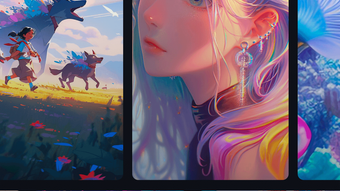
墨染-AI is a multimedia application designed for iPhone users seeking to explore creative expression through artificial intelligence. The software enables users to transform personal photographs into artistic masterpieces using advanced AI-driven techniques. By leveraging a range of artistic styles—ranging from classical works inspired by Van Gogh and Monet to modern interpretations like anime and vibrant color palettes—it offers a versatile platform for digital art creation.
The application supports keyword-based input, allowing users to generate unique visual content by simply describing their desired artistic direction. This functionality makes it accessible to both casual users and those with an interest in digital art. The app is positioned as a creative tool that bridges personal photography with high-level artistic design, enabling users to create custom wallpapers, share artistic interpretations, or experiment with identity transformation through visual personas such as angels or fairies.
While the developer, 墨染科技, has not provided detailed background information, the app’s focus on AI-powered visual transformation suggests a strong emphasis on innovation and user-driven creativity. Its real-world applications include personalizing mobile devices, enhancing social media content, and supporting creative exploration without requiring traditional art skills.
Key Features & Capabilities
- AI-Powered Photo Transformation – Users can convert ordinary photos into stylized artworks using AI algorithms that emulate various artistic techniques and historical styles.
- Style Variety – The application supports multiple artistic genres, including works inspired by famous painters such as Van Gogh, Monet, and Picasso, as well as modern styles like anime and vibrant color expression.
- Keyword-Based Art Generation – By entering descriptive keywords, users can guide the AI to produce visual content aligned with their creative vision.
- Character Transformation – The app allows users to reimagine themselves as fantastical beings such as angels or fairies, creating personalized art pieces with imaginative themes.
- Wallpaper Creation – Users can generate high-quality, custom wallpapers for their iPhone, enhancing device personalization with unique digital art.
These features are designed to streamline the creative process, enabling users to produce visually striking content with minimal effort. For instance, a user can take a casual portrait, input “Van Gogh style,” and receive an oil-painted rendition within seconds. Similarly, entering “fairy wings, glowing aura” may generate a stylized self-portrait with magical elements.
The tool is particularly useful for individuals who wish to express themselves artistically without formal training. It also supports content creation for social media, personal projects, or digital collections. While specific technical details about processing speed or style accuracy are not provided, the described workflow suggests a user-friendly, AI-driven experience focused on accessibility and creative output.
User Interface, Workflow & Performance
The user interface of 墨染-AI appears to be optimized for touch-based interaction on iPhone, prioritizing simplicity and visual feedback. Navigation likely centers around a streamlined dashboard where users can upload photos, select styles, enter keywords, and preview results. The workflow is designed to be intuitive: after uploading an image, users choose a style or input a description, then initiate the transformation process.
The interface may include real-time previews or progress indicators to enhance user engagement. While detailed performance metrics such as CPU usage, RAM consumption, or processing time are not specified, the application’s 150 MB size suggests it is lightweight and optimized for mobile environments. The developer did not provide additional system requirements, so performance expectations are based on typical iOS app behavior.
Stability is assumed to be consistent with standard iPhone applications, though specific crash reports or update history are not available. Overall, the workflow emphasizes speed and ease of use, allowing users to generate artistic outputs in a matter of seconds. The absence of detailed technical data does not detract from the app’s core value proposition: accessible, AI-driven creativity.
Compatibility & System Requirements
墨染-AI is available exclusively on iPhone, indicating its compatibility with iOS devices. The software version is listed as 1.0.1, suggesting it is in its initial release phase with potential for future updates. The installation size is 150 MB, which is relatively modest for a multimedia application with AI processing capabilities.
This size implies efficient resource management and minimal storage impact on the device. However, the developer did not specify exact system requirements, such as minimum iOS version, processor type, or memory specifications. As a result, compatibility with older iPhone models cannot be confirmed.
Users should ensure their device meets standard iOS app requirements to run the application smoothly. The app is distributed through the Apple App Store, and updates are managed via the platform’s ecosystem. For users seeking optimal performance, it is recommended to use a device with a recent iOS version.
Without further details, the exact hardware or software prerequisites remain unclear.
Pros and Cons
Pros
- Intuitive interface tailored for iPhone users
- AI-driven transformation of photos into diverse art styles
- Support for keyword-based creative input for personalized results
- Ability to generate custom wallpapers and artistic personas
- Lightweight installation size (150 MB)
Cons
- No public information on system requirements or compatibility with older devices
- Subscription model may lead to recurring costs (noted in app terms)
- Performance and resource usage details were not disclosed
- Limited to iPhone; no support for other platforms
- Full feature access may require in-app purchases or subscriptions
FAQ Section
Is 墨染-AI compatible with all iPhone models?
Compatibility information is limited. The app is designed for iPhone, but exact device requirements were not provided by the developer.
Is the app safe to use on my iPhone?
As a mobile application distributed through the Apple App Store, 墨染-AI undergoes Apple’s review process. However, users should review the app’s privacy policy and terms of service for data handling practices.
Does 墨染-AI require a subscription?
The app offers automatic subscription services with different packages and pricing. Subscriptions are billed through the user’s iTunes account.
Can I use 墨染-AI offline?
While the app may allow limited offline use after initial processing, AI-based features typically require internet connectivity for image analysis and style generation.
How often are updates released?
Updates are managed through the Apple App Store. The current version is 1.0.1, and future updates may include new styles, performance improvements, or feature enhancements.
Final Thoughts + CTA
墨染-AI presents a compelling fusion of artificial intelligence and creative expression, offering iPhone users a powerful tool to transform everyday photos into artistic masterpieces. Its ability to emulate renowned art styles and generate imaginative visual personas makes it ideal for individuals seeking to personalize their devices or explore digital art without technical barriers. While the app’s full functionality may depend on subscription tiers and internet access, its lightweight design and intuitive workflow enhance accessibility.
The lack of detailed system requirements and performance data is a limitation, but the app’s core functionality remains focused and effective. For creative users, hobbyists, and those passionate about visual storytelling, 墨染-AI delivers a unique and engaging experience. Download 墨染-AI now and unlock your artistic potential today.







